Complete Warehouse Stock Opname Guide: SOP, Steps, & Sample Reports

Read also: How to Calculate Food & Beverage COGS Correctly (Avoid Losses in 2026)
When managing inventory, one critical process you should never overlook is stock opname (physical inventory counting). This process is not just routine—it is the key to maintaining accurate financial data in your business.
Do you often experience stock mismatches? Or struggle to identify the cause of inventory discrepancies? This article provides a complete guide—from definitions and SOPs to digital solutions that minimize human error.
---
What Is Stock Opname?

Stock opname is the process of physically counting inventory in a warehouse or store to ensure that system records match the actual stock on hand.
Main Objectives & Benefits:
- Accuracy Verification: Ensure bookkeeping records match real conditions.
- Discrepancy Identification: Detect stock leakage or excess inventory early.
- Damage Detection: Identify damaged or expired goods (dead stock).
- Performance Analysis: Classify fast-moving vs slow-moving items.
When Should Stock Opname Be Conducted?
The timing depends on company policy, but generally falls into three categories:
- Annual: At the end of the accounting period for financial reporting (Balance Sheet).
- Monthly: Routine control to maintain stock stability.
- Daily (Cycle Counting): Partial counts for high-value or fast-moving items conducted on rotation.
---
Proper SOP & Steps for Stock Opname
To ensure accurate audits without disrupting operations, follow these 5 stages:
1. Preparation Stage (Planning)
Choose the best timing—weekends or outside operational hours—to minimize disruptions. Ensure no stock movements (incoming/outgoing) during the process. Prepare audit teams, labeling stickers, and tools like barcode scanners to speed up the counting process.
---
2. Physical Counting Stage (Execution)
Print stock data using the blind count method (without displaying system quantities) so staff count objectively.
Use inventory apps or barcode scanners for accuracy. Label items once counted to avoid double counting.
---
3. Data Input to the System
Submit manual results to the admin team for entry into Excel or directly into a POS inventory system like ReBill POS.
Using integrated inventory software significantly reduces human error when handling thousands of SKUs.
---
4. Data Reconciliation
Compare physical counts with system data.
If discrepancies are found, analyze causes such as miscounts, administrative errors, or potential stock leakage.
This step ensures data integrity before final stock locking.
---
5. Discrepancy Analysis & Adjustment
Once validated, submit results to accounting for adjustment entries.
Close the process with a comprehensive stock opname report and signed audit documentation.
---
Formula to Calculate Ending Stock
If using manual recording, apply this basic formula:
Ending Stock = Beginning Stock + Incoming Goods – Outgoing Goods
Example Case:
Rejeki Wholesale Store has an initial stock of 500 sacks of rice.
- Purchases this month: 200 sacks
- Sales this month: 350 sacks
System Ending Stock: (500 + 200) – 350 = 350 sacks
Physical Count Result: 340 sacks
Result: 10 sacks missing — requires investigation.
---
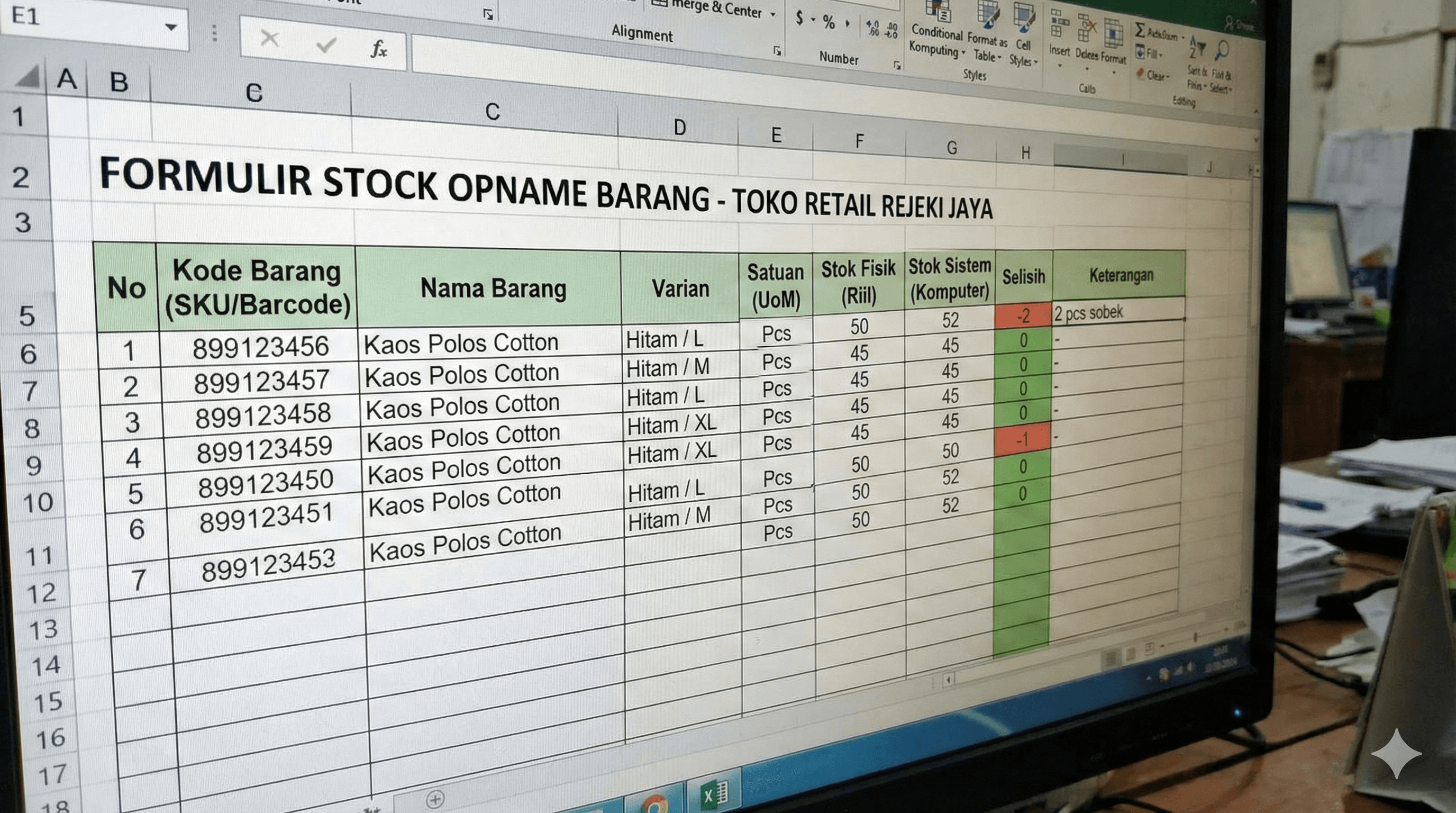
Sample Stock Opname Report Format
Read also: SAVE PAPER & MONEY! How to Send Receipts via WhatsApp
Manual Excel Format
| Item Code | Item Name | Beginning | In | Out | System Stock | Physical | Variance |
|---|---|---|---|---|---|---|---|
| BRG-001 | Rice | 500 | 200 | 350 | 350 | 340 | -10 |
| BRG-002 | Cooking Oil | 100 | 50 | 30 | 120 | 120 | 0 |
| BRG-003 | Sugar | 300 | 100 | 120 | 280 | 275 | -5 |
---
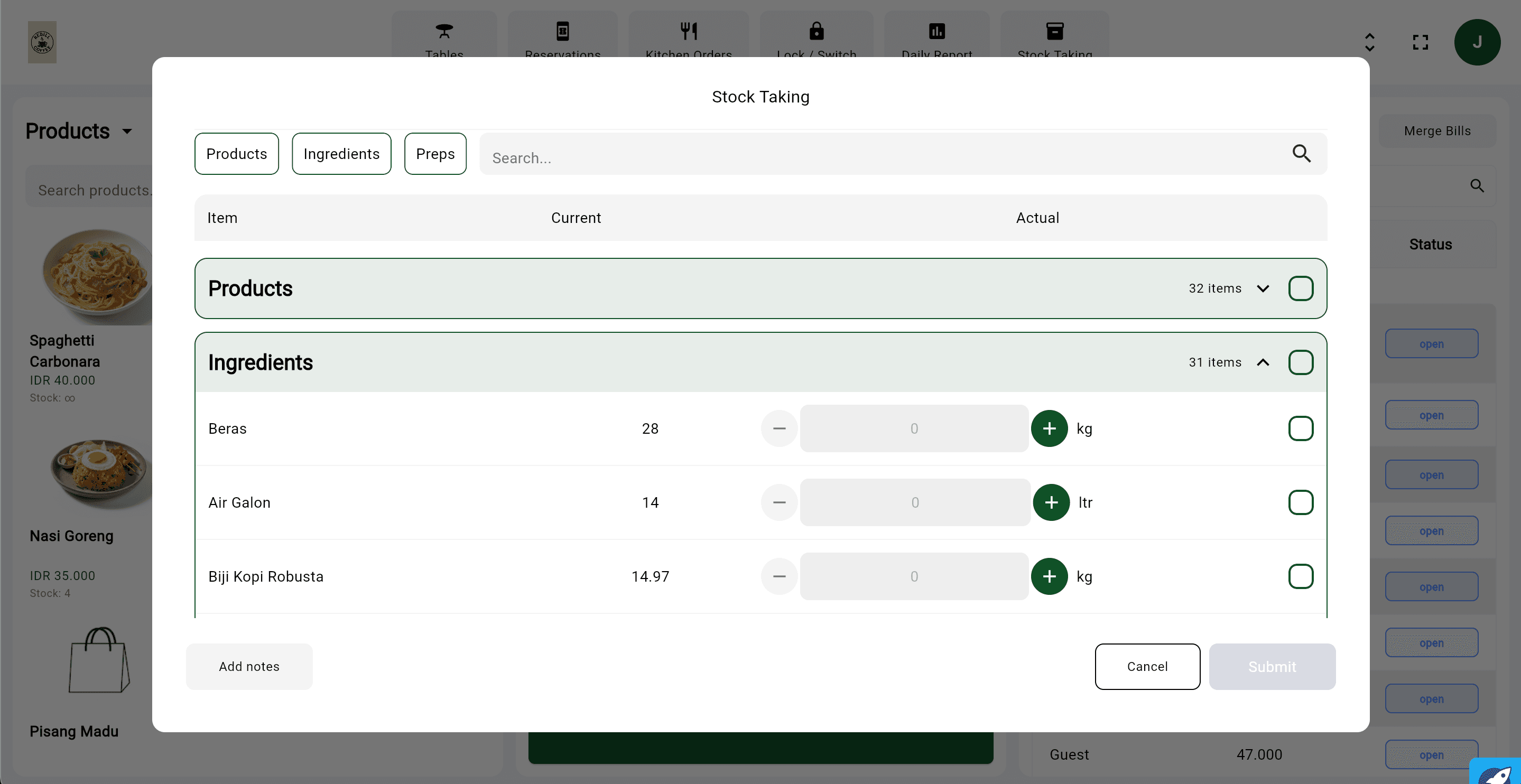
Automated Stock Opname Report (ReBill POS)
Read also: Affordable POS Application 2026: Complete Solution for SMEs
With modern POS software like ReBill POS, you no longer need manual spreadsheets.
The system provides:
- Variance Reports: Automatic plus/minus calculations
- Loss Valuation: Calculates monetary value of missing items
- Audit Trail: Tracks which staff entered data
---
Tips for Effective & Accurate Stock Opname

To ensure accurate stock audits:
- Organize inventory before counting
- Assign trained and competent staff
- Conduct counts during low-traffic hours
- Use barcode scanners & integrated inventory apps
Routine stock audits ensure financial accuracy and prevent profit leakage.
ReBill POS simplifies the process with:
- Real-time stock tracking
- Inventory mutation logs
- Fast-moving item analysis
- Automated stock opname reports
Learn more about ReBill inventory management features here: 👉 https://dashboard.rebill-pos.com/demo
---
Conclusion
Healthy warehouse management starts with accurate data.
By conducting regular stock opname and leveraging modern technology, you can prevent profit leakage and ensure long-term business sustainability.
Want faster, more accurate, and hassle-free stock opname?
Upgrade to ReBill POS, the best cloud POS system equipped with advanced inventory management features.
Try the demo here: 👉 https://dashboard.rebill-pos.com/demo
Ready to customize your POS system? Contact us via WhatsApp: 👉 https://api.whatsapp.com/send/?phone=%2B6281224464422&text&type=phone_number&app_absent=0